Grading Workflow Software: Automate Card Grading for Faster, Accurate Results
Explore how grading workflow automation and integrated centering solutions enhance speed, accuracy, and consistency in card grading, ensuring successful outcomes.

Estimated reading time: 12 minutes
Key Takeaways
- Speed & Consistency: Grading workflow software automates processes to accelerate grading while maintaining objective criteria.
- Integrated Centering: Computer-vision centering ensures fair and reproducible subgrades.
- Digital Traceability: A full digital workflow provides auditability and rich analytics.
- Hybrid Approach: Combining AI engines with human review handles exceptions effectively.
- Scalable Best Practices: Pilots, clear KPIs, and interoperable tools smooth adoption.
Table of Contents
- Introduction
- Understanding grading workflow software
- Integrated centering solutions
- Card grading digital workflow
- Integration of centering tools
- Case Studies
- Best Practices
- Future Trends
- Conclusion
- FAQ
Introduction
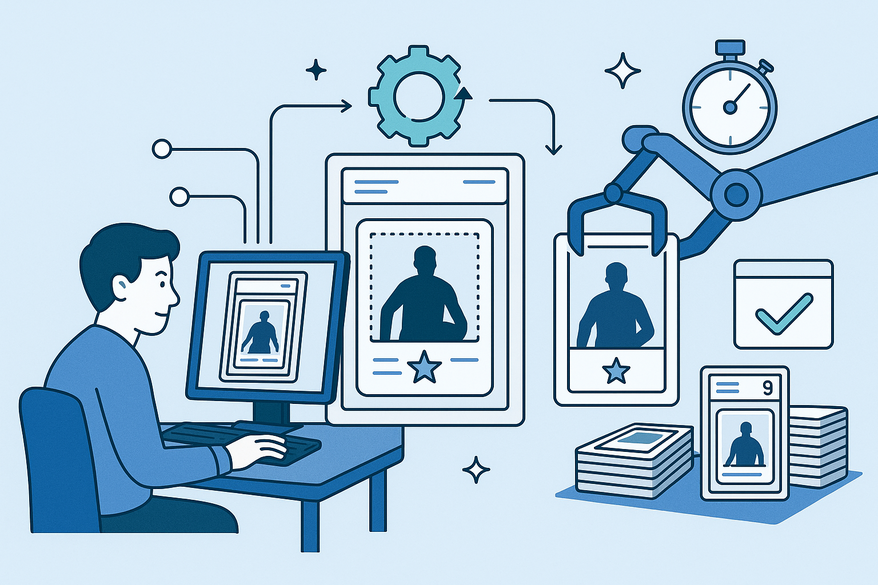
Grading workflow software automates the entire card grading process—from intake and imaging to centering measurement, defect evaluation, grading, encapsulation, and reporting—using AI and computer vision technologies. This automation enhances speed, accuracy, and consistency, reducing human error and labor costs. Integrated centering solutions play a vital role by providing objective, reproducible subgrades that directly influence card value.
In this article, we explore how grading workflow software streamlines card grading with integrated centering, enabling faster, fairer, and scalable grading operations. We cover definitions, core automated stages, integration techniques, case studies, best practices, and future trends to help you understand and implement these solutions effectively.
For more insights, see the workflow automation blog post, the grading framework knowledge base, and automation benefits in fruit and vegetable grading technology.
Understanding grading workflow software
Definition
Grading workflow software is an AI-driven or rule-based system that automates card grading steps including intake, imaging, computer-vision analysis, centering measurement, defect detection, grading logic, and reporting. It ensures uniform application of grading criteria with minimal human input, improving objectivity and throughput.
Core automated stages
- Intake and order management (barcode/QR assignment)
- High-resolution imaging under standardized lighting
- Computer-vision analysis for border detection and defect spotting
- Centering measurement with precise margin ratio calculations
- Defect detection on surface, edges, and corners
- Grading logic applying rule engines or AI models to assign subgrades
- Report and label generation for encapsulation and customer communication
Key benefits
- Speed & Throughput: Accelerates grading beyond manual capabilities.
- Accuracy & Objectivity: Precise vision systems enforce consistent grading standards.
- Consistency: Eliminates grader variability and subjectivity.
- Cost & Scalability: Supports volume growth without proportional staffing increases.
- Data & Analytics: Captures detailed metrics for defect trends and quality control.
Education-grading parallels
Similar AI-driven grading software in education has reduced report turnaround time by over 70% and improved grading consistency. This demonstrates the value of combining rule-based engines with AI models in high-volume, quality-sensitive workflows. Learn more from AI-driven educational grading systems and handling subjective assessments.
Integrated centering solutions
Definition
Integrated centering solutions use imaging hardware and software to capture card images under controlled conditions, detect card borders and artwork boundaries, calculate precise centering ratios (left/right, top/bottom margins), and feed these metrics directly into the grading workflow.
Why centering matters
Centering is a critical subgrade that significantly affects card quality and market value. Manual centering checks are slow and inconsistent. Automated centering applies objective geometric rules, ensuring fairness and reproducibility across all cards.
For a detailed tutorial, see the step-by-step centering measurement guide. Collectors and graders often use Card Centering Tool to pre-check centering tolerances before submission, helping avoid costly grading fees.
Benefits of automating centering
- Consistency: Eliminates human measurement error for uniform results.
- Fairness: Applies defined standards objectively to all cards.
- Auditability: Creates digital records linking centering metrics to final grades.
Integrating centering tools into grading workflow software removes manual steps, simplifies audits, and assures transparent subgrade metrics. Learn more in fruit and vegetable grading insights.
Card grading digital workflow
Definition
A digital grading workflow replaces paper-based processes with online submissions, barcode/QR tracking, centralized image repositories, automated grading engines, and digital reporting. This orchestration enhances traceability, efficiency, and customer communication.
- Online submissions and digital work orders
- Barcode/QR tracking and metadata capture
- Central image repository with version control
- Automated grading interfaces using rule engines or AI
- Digital reporting and customer notifications
Key tools include workflow engines, imaging and computer-vision software, grading logic engines, analytics platforms, and integration APIs. See the workflow automation blog post for more details.
Integration of centering tools in grading workflow software
- Intake & ID assignment: Assign barcode/QR codes and record metadata, triggering imaging on scan.
- Imaging: Capture high-resolution scans under calibrated lighting, storing images centrally.
- Automated centering analysis: Vision modules detect edges, calculate margin ratios, and assign centering subgrades (e.g., ±5% margin deviation = perfect centering).
- Additional automated checks: Evaluate corner sharpness, edge cleanliness, surface defects, and dimensions.
- Grade calculation: Aggregate subgrades via rule-based or AI engines into an overall grade.
- Human review (hybrid): Expert graders handle flagged or premium-tier cards.
- Labeling & reporting: Auto-generate encapsulation labels and digital reports, pushing results to customer portals.
Enabling software & tools
- Industrial cameras and image-processing libraries
- Workflow automation platforms with BPM capabilities
- AI/ML toolkits for defect detection and adaptive grading logic
- Analytics systems for metrics capture
- For a deeper dive, see the automated centering analysis overview.
Centering tools operate as integrated services called by the workflow engine, writing results directly into the central grading record. This eliminates manual handoffs and improves efficiency.
Case Studies: grading workflow software in action
Example 1 – Mid-size grading company pilot
Before automation: Manual centering measurements caused high variability and frequent customer disputes.
After automation: Computer-vision centering increased throughput per grader by 50%, reduced disputes through transparent margin overlays, and cut grading time in half. Benefits mirrored those seen in produce and education automation.
Example 2 – High-volume operation near-full automation
A fully digital pipeline with AI grading models, integrated centering, and defect detection allows human graders to intervene only on exceptions. Benefits include labor reduction, scalable throughput, and factory-level precision.
Best Practices for grading workflow software and centering solutions
- Identify repetitive tasks: Prioritize centering, data entry, label printing, and routing for automation.
- Define objectives & KPIs: Track grading time, inter-grader agreement, regrade rate, and customer satisfaction.
- Map your workflow: Diagram each step and highlight automation opportunities.
- Select interoperable tools: Choose systems with open APIs and shared data models for seamless integration.
- Pilot centering first: Focus on measurable, customer-visible improvements with quick ROI.
- Use a hybrid AI-human model: Automate measurements while routing complex cases to experts.
- Monitor, audit, iterate: Use dashboards to track metrics, audit results, and gather feedback for continuous improvement.
Address challenges by investing in calibrated imaging setups, running side-by-side comparisons, configuring exception routing, and phasing rollouts.
Future Trends in grading workflow software
- Advanced computer vision and deep learning for more precise defect analysis.
- End-to-end AI-assisted grading with minimal human verification.
- Consumer-facing pre-grading mobile apps for centering and grade previews.
- Richer analytics dashboards showing defect distribution and override rates.
- Industry standards for digital grading records to ensure comparability and verification.
These trends will enable fully automated, reliable, and seamless card grading experiences.
Conclusion: grading workflow software
Grading workflow software powered by integrated centering and digital pipelines transforms card grading into a scalable, data-driven process. It delivers speed, accuracy, consistency, and cost savings validated by parallels in produce and educational assessments. Automated centering ensures fair, reproducible subgrades, while digital workflows provide traceability from intake to reporting.
Automation enhances human expertise by allowing skilled graders to focus on nuanced decisions while systems handle repetitive measurements and process orchestration, driving high-quality grading at scale.
Learn more at the OptoFidelity insights.
FAQ
- What is grading workflow software? It is an AI-driven or rule-based system automating intake, imaging, defect analysis, centering, grading, and reporting with minimal human input.
- Why is centering important? Centering is a crucial subgrade that impacts card value. Automated centering applies consistent geometric rules for fair, reproducible results.
- How does grading workflow software improve grading? It replaces manual steps with digital submissions, centralized image repositories, automated grading engines, and reporting, enhancing speed, accuracy, and traceability.
- Can grading workflow software scale grading operations? Yes, it increases throughput without proportional staffing increases, reducing labor costs while maintaining quality.
- What role does AI play in grading workflow software? AI models analyze images, detect defects, measure centering, and assign grades, enabling consistent and objective grading decisions.