Best Card Centering Tool and App for Precise Grading: Midpoint
Discover the best card centering tools for perfect grading in 2024, ensuring your cards are impeccably aligned for top grades. Enhance your collection's value.

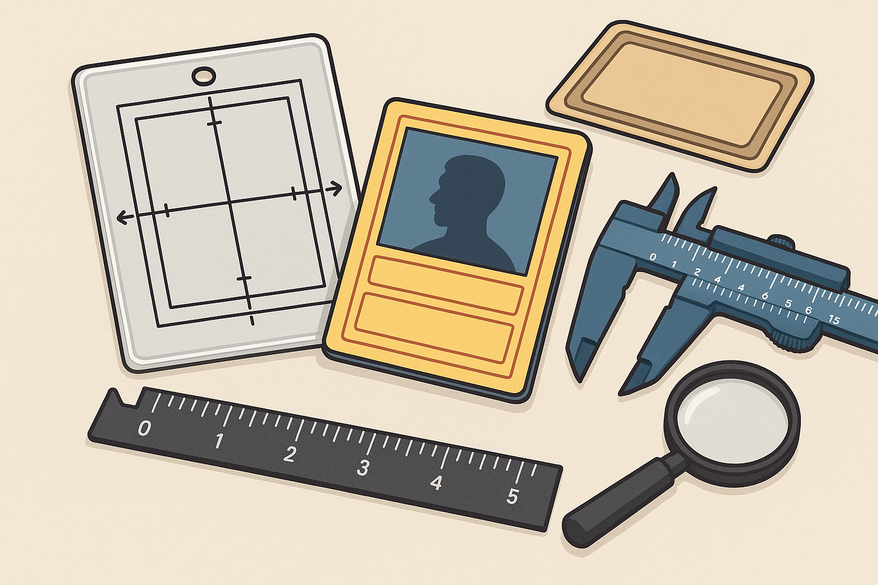
Best Card Centering Tool and App for Precise Grading: Midpoint
Looking for the best card centering tool or card centering app to get precise, reliable measurements and improve your trading card grading results? Accurate centering is a key factor for grading companies like PSA, BGS, CGC, and TAG, especially for sports cards and popular trading card games such as Pokémon, Magic: The Gathering, and Yu-Gi-Oh. Using a trusted centering app or tool helps you measure border alignment precisely, avoid costly grading surprises, and maximize your card’s value. This guide focuses on top card centering tools and apps, including the leading digital option, Midpoint, which offers real-time centering analysis and AI grading estimates.
What Is a Card Centering Tool or App?
A card centering tool or app measures how evenly the borders and images of a trading card are aligned—a critical factor in professional grading. The best card centering tools and apps include physical devices like rulers and overlays, as well as advanced digital apps that use your smartphone camera and AI to provide precise centering scores. These tools help collectors pre-screen cards before submission, improving grading outcomes and confidence. For more on grading standards, see our detailed Card Grading: How It Works, What to Know, and When It's Worth It.
Top Card Centering Tools and Apps
- Midpoint App
The Midpoint app is widely regarded as the best card centering app for real-time, AI-powered centering analysis. Using your phone’s camera, it overlays measurement lines and calculates a precise centering score instantly. Beyond centering, Midpoint offers AI grading estimates for PSA, BGS, CGC, and TAG, card lookup across 250,000+ cards, and portfolio tracking. It supports Pokémon, Magic: The Gathering, Yu-Gi-Oh, sports cards, Lorcana, and more.- Pros: Fast, portable, supports multiple card sizes, detailed scoring, all-in-one grading features.
- Cons: Requires a steady hand for best accuracy.
- User Rating: 4.7/5 (app store reviews)
- Center Stage App
Center Stage uses AI to analyze centering and provide a percentage score, helping collectors estimate how their cards might grade. It is regularly updated to support new card sets.- Pros: AI-driven, quick results, compatible with most smartphones.
- Cons: May misread cards with unusual borders occasionally.
- User Rating: 4.5/5
- Grading Ruler (Physical Tool)
A plastic ruler marked for standard card dimensions and border thickness, favored by collectors who prefer hands-on measurement without devices.- Pros: No batteries needed, durable, inexpensive.
- Cons: Manual measurement less precise, slower for large collections.
- User Rating: 4.3/5
- Card Centering Overlay
Transparent overlays with grid lines designed to fit standard card sizes for quick visual centering checks.- Pros: Easy to use, portable, no setup required.
- Cons: Less precise than digital tools, limited to standard sizes.
- User Rating: 4.2/5
- Card Grading App
Offers centering analysis plus surface and corner checks, ideal for collectors wanting an all-in-one grading pre-check.- Pros: Multi-featured, regular updates.
- Cons: Some premium features require subscription.
- User Rating: 4.4/5
How to Choose the Best Card Centering Tool or App
- Accuracy: Digital apps generally provide more precise centering measurements, while physical tools offer quick, tactile checks.
- Ease of Use: Apps may have a learning curve but deliver faster results for large collections; physical tools are straightforward but slower.
- Compatibility: Ensure the tool or app supports your card sizes and types, including Pokémon, sports, Magic, and more. For details, see our Sports Card Collecting: The Ultimate Guide for Modern & Vintage Collectors.
- Budget: Physical tools are usually one-time purchases; some apps offer free basic versions with optional subscriptions.
- User Reviews: Look for high ratings and positive feedback on accuracy and reliability to find the best fit for your needs.
Card Centering Tool and App Reviews and Ratings
Community feedback shows that digital apps like Midpoint and Center Stage are favored for their speed, accuracy, and ability to analyze multiple cards quickly. Physical tools remain popular for their simplicity and tactile feel. Many collectors recommend using both digital and physical tools to ensure the most accurate centering checks before grading. If you want the best card centering app for bulk grading or a reliable tool for on-the-go checks, these options cover all needs. For a full overview, see our Card Condition: The Complete Guide to Grading, Inspection, and Value.
Tips for Accurate Card Centering Checks
- Use bright, even lighting to avoid shadows that can affect measurements.
- Keep your cards and tools clean to prevent smudges that interfere with readings.
- Take multiple measurements for high-value cards to ensure accuracy.
- Compare your results against official grading standards from PSA, BGS, or your chosen grading company.
- Use the best card centering tool or app suited to your card type and grading goals for optimal results.
Frequently Asked Questions
- What is the best card centering tool or app?
The best option depends on your needs. Apps like Midpoint provide fast, precise centering and AI grading estimates, while physical tools like rulers and overlays offer reliable manual checks. Many collectors use both for comprehensive assessment. - What makes a card centering app the best?
The best app delivers real-time analysis, supports multiple card sizes and games, and consistently provides accurate results. Features like easy scoring, card lookup, and portfolio tracking add value. - Are card centering apps accurate?
Modern apps use advanced algorithms and can be very accurate, though lighting and camera quality affect results. Follow app instructions closely and take multiple readings for best accuracy. - Should I use both a digital and a physical centering tool?
Yes, many collectors use apps for bulk analysis and physical tools for spot-checks to maximize accuracy and convenience. - Will using a centering tool or app guarantee a higher grade?
No tool guarantees a grade, but accurate centering measurement helps you select the best cards to submit, increasing your chances of higher grades. - What features should I look for in the best card centering app?
Look for real-time centering analysis, support for various card sizes and games, clear scoring, card lookup, positive user reviews, and regular updates.
Choosing the best card centering tool or app depends on your collection size, grading goals, and preferences. Use the insights above to select the right tool and improve your card grading success.
Free to start
Try the Midpoint app
Grade any card from a photo, see its raw and PSA 10 value, and track what your collection is worth — free.
Get it on iPhoneGet it on Android