How to Track a Card Collection Effectively
Learn how to track a card collection with apps, spreadsheets, and best practices for cataloging, value tracking, and insurance.


Estimated reading time: 12 min
Key Takeaways
- Choose the right tracking method: app, spreadsheet, or website.
- Record essential card details for accurate cataloging and valuation.
- Use tools like Midpoint for AI grading estimates and portfolio tracking.
- Organize cards by status and track collection value over time.
- Maintain backups and document your collection for insurance and security.
Tracking a card collection is useful for collectors who want to protect, organize, and understand the value of their cards. Whether you collect Pokémon, Magic: The Gathering, sports cards, or other trading cards, having a clear system to catalog and monitor your collection can help you make informed decisions about grading, selling, or holding your cards. This guide covers how to track a card collection using apps, spreadsheets, and best practices for storage, insurance, and portfolio management.
Step 1: Choose Your Tracking Method
Before you start cataloging, decide how you want to track your collection. There are three popular options:
- Spreadsheet: A customizable but manual method. Great if you prefer hands-on control and don’t mind updating data yourself.
- Dedicated Card Collection App: Apps like Midpoint offer AI-powered grading estimates, price tracking, and portfolio management tailored for card collectors.
- Online Websites: Some card marketplaces and collector sites provide inventory features with live pricing but might lack grading tools.
Using a card collection app like Midpoint can be an easy and powerful option. It combines cataloging, grading estimates, and value tracking in one place, potentially saving time and improving accuracy.
Step 2: Record Essential Card Details
To organize your collection effectively, record important details for each card. This will make searching, sorting, and valuation easier. Key fields to include are:
- Year & Set/Brand: Identify the card’s release and series.
- Player/Subject Name: The featured player, character, or subject.
- Card Number & Variation: Helps differentiate rare or alternate versions.
- Condition & Grade: Raw condition notes or professional grading information.
- Quantity: Number of copies owned.
- Purchase Details: Cost, date, and place of purchase.
- Current Market Value: Use live pricing tools or app estimates.
Apps like Midpoint use AI to provide grading estimates by analyzing centering, corners, edges, and surface, which may help you record an estimated PSA, BGS, CGC, or TAG grade before submitting for professional grading. This can be helpful for assessing which cards to grade or sell, though professional grading remains the definitive standard.
Step 3: Add Cards Quickly and Accurately
Inputting cards one by one can be time-consuming. To speed up the process:
- Use Barcode or QR Scanning: Many apps support scanning cards or barcodes to auto-fill details.
- Bulk Import/CSV Upload: If you have an existing spreadsheet, upload it into the app to avoid re-entering data.
- Checklist or Set Entry: Use pre-made checklists for popular sets to mark which cards you own.
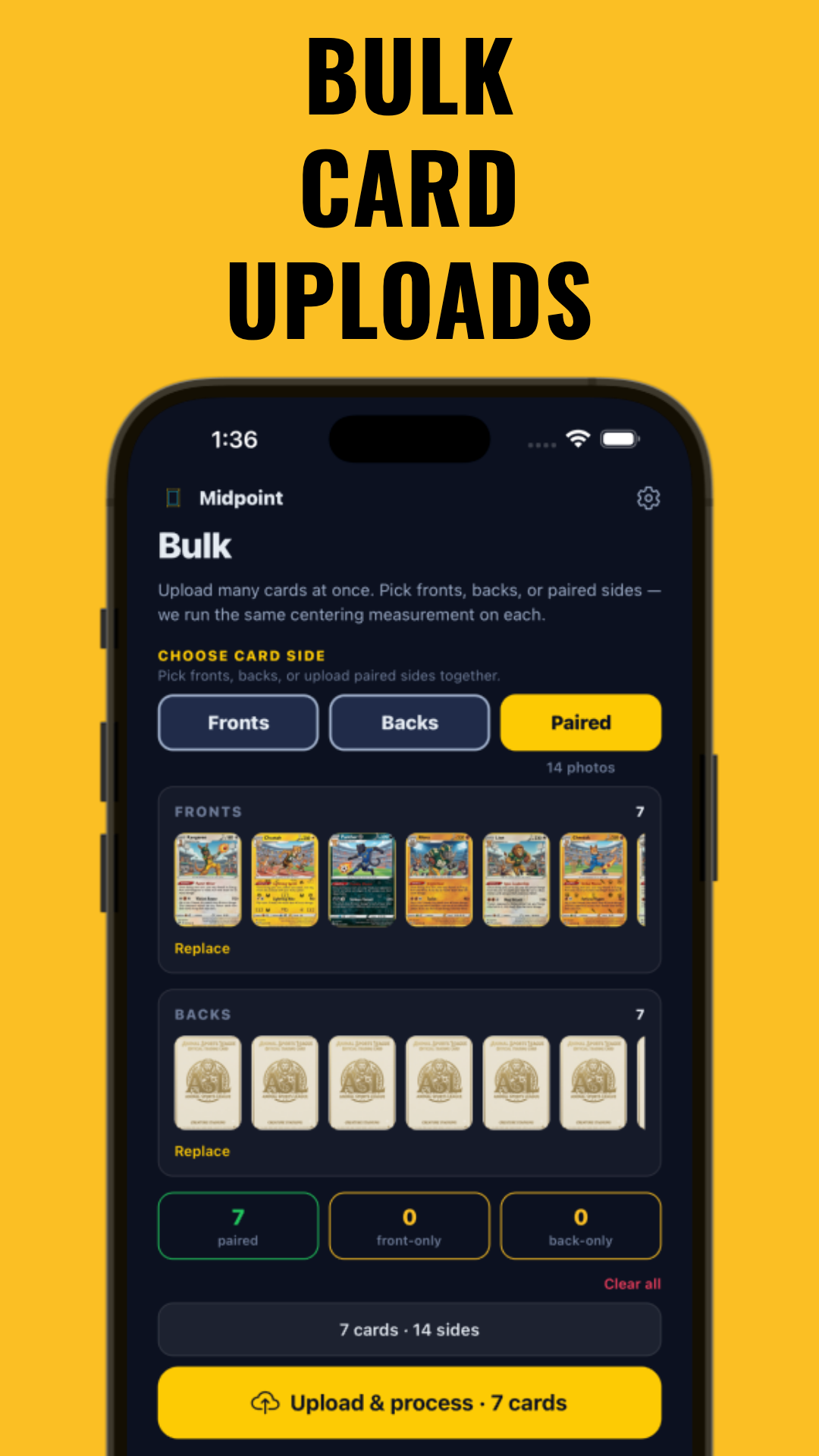
Midpoint supports bulk upload and processing, enabling fast and efficient cataloging even for large collections. Screenshot of the bulk upload interface shows how simple it is to get started quickly:
Step 4: Track Collection Value Over Time
Understanding your collection’s value fluctuations can be helpful for making selling or insurance decisions. A card portfolio tracker helps you:
- Monitor live market prices for raw and graded cards.
- See your collection’s total value and value by individual card.
- Visualize value trends with portfolio charts.
Midpoint provides market pricing data across many cards, showing raw vs graded values and enabling you to track your collection’s worth over time. This insight can assist in deciding when to sell cards or hold them as an investment.
Step 5: Record Cost Basis and Profit/Loss
To evaluate your card investments accurately, track your purchase price and additional costs such as:
- Shipping fees
- Grading fees
- Taxes and import duties
Recording these details allows you to calculate net profit or loss when you sell cards. This data also helps with insurance valuations and tax reporting.
Step 6: Organize Cards by Status and Storage
Keeping your collection organized by status improves management. Typical categories include:
- Personal Collection (PC): Cards you keep for display or enjoyment.
- For Sale: Cards you plan to sell soon.
- For Trade: Cards available for trading with other collectors.
- Sold: Keep records of sold cards for profit tracking.
- Binder or Deck/Stash: Cards stored in binders or decks.
For physical protection, follow best practices on how to store valuable cards, including using sleeves, top loaders, and climate control.
Step 7: Manage Large Collections Efficiently
For collectors with hundreds or thousands of cards, start by cataloging high-value or rare cards first. Then backfill with common cards over time. This prioritization helps you focus on what matters most for insurance and portfolio tracking.
Regularly update your inventory with new acquisitions and review existing data to keep your collection current.
Step 8: Add Photos, Notes, and Backup Your Collection
Including photos and notes enhances your records and helps with insurance claims or grading decisions. Keep detailed notes about card condition, provenance, or seller information.
Always back up your digital inventory data using cloud storage or export features to protect against data loss.
Tips & Common Mistakes
- Don’t skip detailed condition notes: Raw vs graded conditions greatly affect value.
- Update values regularly: Market prices fluctuate, so refresh your portfolio data periodically.
- Use AI grading tools cautiously: Tools like Midpoint’s AI centering and grading estimates can provide helpful guidance but do not replace professional grading.
- Separate raw and graded entries: Track raw and graded versions of the same card separately to avoid confusion.
- Document all acquisition costs: This ensures accurate profit/loss and insurance values.
Conclusion
Tracking your card collection effectively can transform it from a hobby into a well-managed portfolio. By choosing the right tools, recording comprehensive data, organizing by status, and monitoring value trends, you can better protect your investment, plan smart sales, and enjoy your collection with confidence.
Apps like Midpoint make this process easier with AI-powered grading estimates, detailed card lookup, and portfolio tracking all in one place. Consider starting to catalog your collection today to stay organized in the trading card world.
FAQ
What is the best app to track a card collection?
Midpoint is a popular choice because it combines AI digital grading estimates, card lookup with live market values, and portfolio tracking for many card types.
How do I organize my trading card collection in a spreadsheet?
Use columns for year, set, player, card number, condition, quantity, purchase price, and current value. Update regularly and consider bulk import into apps later.
How do I track the value of my cards over time?
Use a portfolio tracker app like Midpoint that provides market pricing data and charts to monitor collection value trends.
What information should I record for each card in my collection?
Record year, set/brand, player or subject, card number, variation, condition or grade, quantity, purchase price, and current market value.
How do I import a big card collection into an app or spreadsheet?
Use bulk import or CSV upload features available in apps like Midpoint to save time and avoid manual data entry.
Should I track raw cards and graded cards separately?
Yes, because raw and graded cards have different values and conditions. Tracking them separately helps with accurate valuation and organization.
Free to start
Try the Midpoint app
Grade any card from a photo, see its raw and PSA 10 value, and track what your collection is worth — free.
Get it on iPhoneGet it on Android