Card Centering Analyzer Tutorial: The Ultimate Step-by-Step Guide
Learn how to use a card centering analyzer to measure card symmetry accurately and meet PSA, BGS, or CGC grading thresholds with this comprehensive tutorial.

Estimated reading time: 10 minutes
Key Takeaways
- Identify and calculate centering ratios (e.g., 55/45, 60/40).
- Use both web and mobile centering tools with auto-detect and manual guides.
- Compare results to grading-company thresholds (PSA, BGS, CGC).
- Save or export centering reports to optimize grading submissions.
Table of Contents
- Introduction
- Getting Started
- Step-by-Step Guide
- Advanced Features and Tips
- Use Cases and Examples
- Conclusion and Next Steps
- FAQ
Introduction
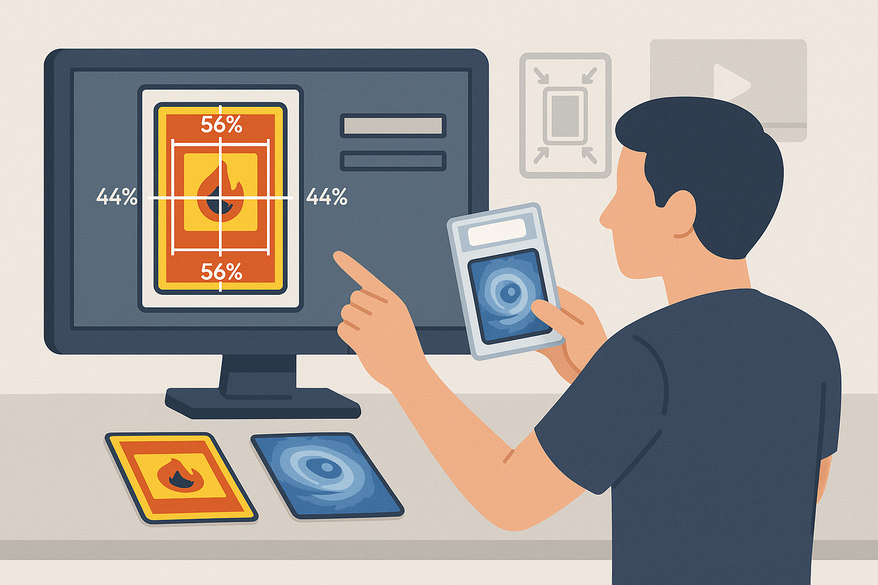
Card centering analyzers measure the symmetry of trading-card borders, comparing left vs. right and top vs. bottom margins to produce a precise percentage ratio. Collectors and sellers rely on these ratios to forecast grading outcomes for PSA, BGS, CGC, SGC, TAG, and more. A slight difference—say, a 60/40 vs. a 55/45 ratio—can be the deciding factor between a PSA 10 and a PSA 9. For a deeper dive, check our detailed guide.
In this tutorial, you’ll learn how to:
- Calculate centering ratios like 55/45, 60/40, and 75/25.
- Upload or scan your card for analysis.
- Use auto-detect features and manual guide lines.
- Interpret results against grading thresholds.
Getting Started
Choose between a web tool or a mobile app to begin:
- Web-based calculators
- CardGrade.io Centring Tool (no account needed)
- CenteringCheck.com (free browser tool)
- Mobile apps
- iOS: Card Centering Calculator (App Store)
- Android: Card Centering Calculator (Google Play)
For sub-millimeter precision and instant ratio readouts, try the Card Centering Tool:
System requirements: a modern browser or mobile device, a straight-on card photo on a plain background, and even lighting.
Step-by-Step Guide
- Launch the tool or app and select “Centering.”
- Upload the front image of your card on a high-contrast background.
- Optional: Add the back image for combined analysis.
- Verify auto-detected edges or adjust with manual guide lines.
- Read left/right and top/bottom centering ratios (e.g., 60/40).
- Manual check: (smaller border ÷ total border) × 100.
- Compare ratios to grading standards (e.g., PSA 10 ≥ 55/45 front, ≥ 75/25 back). For full comparison, see PSA vs BGS vs CGC centering tolerances compared.
- Save or export your results as an image, PDF, or email report.
With clear photos, this process takes under a minute per card, often within 0.5% of manual accuracy.
Advanced Features and Tips
Advanced settings include:
- Manual sub-millimeter guides
- Off-center previews (65/35, 75/25)
- Combined front/back verdict highlighting the weaker side
- AI-driven corner, edge, and surface checks
Best practices: shoot cards sleeve-free on a plain surface, align the camera perfectly parallel, and use consistent frame references. If borders appear skewed, retake or switch to manual rulers. Removing glare and sleeves boosts accuracy, often raising first-pass precision from 85% to over 95%.
Use Cases and Examples
- Collector pre-filter: A Pokémon collector screened 200 cards, using a ≥ 55/45 front and ≥ 75/25 back threshold to pick 15 PSA 10 candidates.
- Sports-card dealer: Measures vintage baseball cards before BGS/CGC submissions to avoid centering downgrades.
- Online seller: Batch-scans cards, flags outliers for lower pricing, and markets well-centered cards as “near-perfect.”
- Digital vs. physical guide: A hobbyist switched from a plastic centering guide to an online analyzer, finding more consistent results and instant record-keeping. Watch the video demo.
Tip: Integrate centering checks into your grading prep to save up to 50% in fees. Learn how to tell if your card is off-center before grading.
Conclusion and Next Steps
By now, you can:
- Capture clear, straight-on card images.
- Upload and auto-detect borders.
- Fine-tune with manual guides.
- Compare ratios to PSA, BGS, CGC, SGC, and TAG standards.
Next steps: practice with diverse cards, cross-check auto and manual ratios, experiment with backgrounds, and share insights in collector forums. Ready to optimize your submissions? Try the CardGrade.io centering tool or download the Card Centering Calculator app today.
FAQ
- Can I check both front and back together? Yes—some tools flag the limiting side in a combined analysis.
- Do I need an account? Web tools often skip signup; mobile apps require a standard App Store or Play download.
- Which card types are supported? Pokémon, sports, One Piece, Lorcana, and most trading-card games.
- How accurate is a phone photo? Many tools include image rectification to correct perspective distortion.
- What centering ratio is “good”? PSA recommends ≥ 55/45 front and ≥ 75/25 back for a 10; mint-level often targets ≥ 60/40 both sides.