Complete Card Centering Analyzer Tutorial: Step-by-Step Guide
Learn how to measure and interpret card centering ratios using a card centering analyzer tool for grading companies like PSA, BGS, and CGC. Step-by-step guide included.

Estimated reading time: 10 minutes
Key Takeaways
- Master the essentials of using a digital card centering analyzer to screen your cards before submission.
- Save on grading fees by identifying off-center cards that could cap your final grade.
- Leverage both auto-detection and manual fine-tuning for the most accurate centering ratios.
- Scan front and back, then base your submission decisions on the worse side’s ratio.
- Use color-coded grade estimates for PSA, BGS, CGC, and more to decide whether to submit or sell raw.
Table of Contents
- Section 1: Understanding the Card Centering Analyzer
- Section 2: Why Centering Matters for Grading
- Section 3: Step-by-Step Card Centering Analyzer Tutorial
- Section 4: Practical Use Cases & Expert Tips
- Section 5: Troubleshooting & Common Issues
- Conclusion & Further Resources
- Call-to-Action
- FAQ
Section 1: Understanding the Card Centering Analyzer
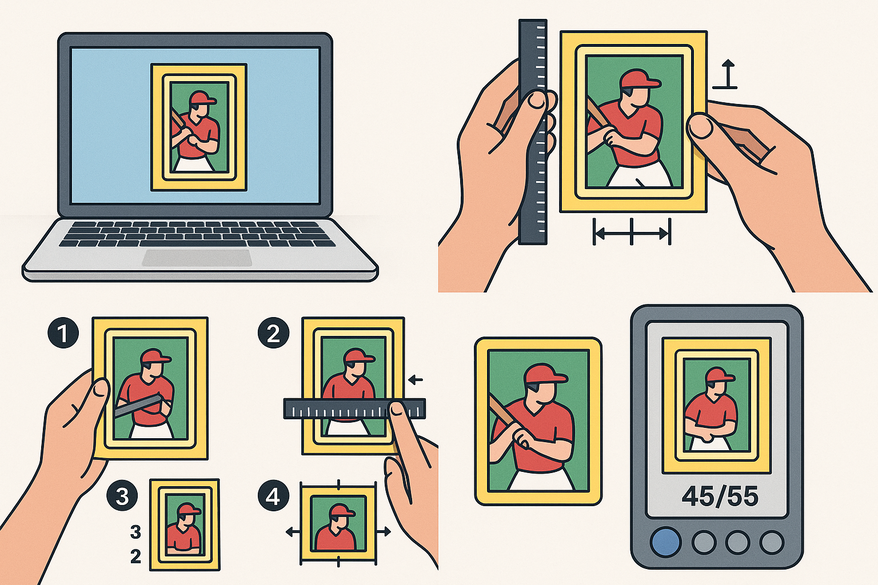
A card centering analyzer is a digital tool—either web-based or a mobile app—that measures the distances between a card’s printed edges and its borders. It outputs centering ratios like 50/50, 55/45, or 60/40 and can even estimate how a grading company might score that centering. For those who prefer a deep dive into manual versus automated measurement methods, see How to Measure Card Centering: A Step-by-Step Guide for Collectors.
Beyond the generic analyzers, you can leverage Card Centering Tool, a web app that automatically calculates left/right and top/bottom centering to PSA, BGS, and CGC tolerances—so you know before you pay grading fees.
Key features of a card centering calculator:
- Image upload or live scan via camera
- Auto-border detection using computer vision and AI
- Manual guides for fine-tuning measurements
- Front and back side scanning for complete subgrade
- Grade estimation or color‐coded indicators for PSA, BGS, CGC
Section 2: Why Centering Matters for Grading
Centering is one of the four main subgrades used by major grading companies. Even if corners, edges, and surface are perfect, poor centering can cap your card’s final grade. For a thorough comparison of centering tolerances, check out PSA vs BGS vs CGC: Centering Tolerances Compared and see how card grading centering standards for PSA, BGS, CGC, SGC, and TAG stack up.
PSA’s 45/55 threshold:
- PSA often requires at least 45/55 (top/bottom or left/right) to award a PSA 10.
- A 60/40 centering ratio on a key card almost always prevents a perfect grade.
BGS expectations:
- BGS 9.5 typically demands better than 55/45 on all sides.
- BGS 9 may accept slightly wider variances but still penalizes extreme off-center.
Section 3: Step-by-Step Card Centering Analyzer Tutorial
3.1 Initial Setup & Installation
Before you start, ensure you have a stable setup. For tips on capturing the best images, see our Trading Card Photography Guide. If you want a comprehensive walkthrough, check out this ultimate step-by-step guide to using a card centering analyzer.
- Mobile:
• Open App Store or Play Store.
• Search for “Card Centering Calculator” and install.
• Grant camera permissions when prompted. - Web:
• Visit your chosen centering tool URL.
• Allow file uploads and camera access in browser settings. - Optional hardware:
• Tripod for consistent top‐down shots
• Plain, non-reflective background (black or white mat)
• Even lighting (avoid flash glare)
3.2 Capturing or Uploading the Card Image
- Place the card flat, remove sleeves/toploaders.
- Position camera directly above for a perfectly straight shot.
- Take multiple photos and choose the sharpest, most level image.
- In the tool, tap “Upload” or “Scan” and select your photo.
3.3 Auto Detection & Initial Measurement
- After upload, the analyzer auto‐detects card borders.
- It calculates left vs. right and top vs. bottom distances.
- Example: left 1.8 mm, right 1.2 mm → ratio = 60/40.
- View instant centering ratio and preliminary grade estimate.
3.4 Manual Fine-Tuning
- Drag the measurement guides to align with printed borders.
- Zoom in for detailed placement, especially on faint borders.
- Adjust each side until guide lines match the true card edge.
- Confirm any changes to centering ratios after manual edits.
3.5 Checking Front & Back Centering
- Scan or upload the front of the card and note its centering ratio.
- Scan or upload the back; the tool calculates back centering.
- Identify the worse side—this often sets the card’s final centering subgrade.
3.6 Reviewing Grade Estimates
- Most tools show color codes: green for “gradeable,” yellow for “borderline,” red for “off‐center.”
- They list potential grades for PSA, BGS, CGC, and SGC based solely on centering.
- Use these estimates to decide if submitting or selling raw is best.
Section 4: Practical Use Cases & Expert Tips
Use Cases for a Card Centering Analyzer:
- Pre-grading screening to filter large stacks efficiently.
- Evaluating online auction photos to avoid hidden off-center cards.
- Selecting the best grading company based on centering subgrade standards. For more details, see our card grade comparisons for PSA, BGS, CGC, and SGC.
- Batch analysis for group breaks or full set reviews.
Expert Tips for Accurate Centering Measurements:
- Always shoot straight-on with a tripod or smartphone holder.
- Remove protective sleeves; reflections distort edge detection.
- Use a plain, high-contrast background to aid auto detection.
- Take at least three consistent images per card to confirm readings.
- Align guides to the printed border, not artwork, for borderless designs.
- Leverage off-center visuals (65/35, 75/25 examples) to quickly discard poor-center cards.
Section 5: Troubleshooting & Common Issues
- Measurement variability
• Ensure exact top-down alignment; use a tripod.
• Retake photos under consistent lighting. - Incorrect border detection
• Switch to a plain background; remove sleeves.
• Manually adjust guides if auto-detect is off. - Borderless card struggles
• Use manual frame alignment along artwork edges. - Off centering estimates seem off
• Remember the tool only measures centering; corners and surface not included.
Conclusion & Further Resources
Using a card centering analyzer gives you a measurable edge in grading prep and screening. You can:
- Quickly identify well-centered cards for submission
- Avoid wasted grading fees on poorly centered cards
- Choose the best grading service based on centering subgrades
Key takeaways:
- Capture clear, straight-on, sleeve-free photos
- Combine auto detection with manual guide adjustments
- Scan both front and back, then use grade estimates wisely
Additional resources:
- Free web tool: CardGrade.io centering
- Jade Lizard Card Centering Calculator
- Mobile Card Centering Calculator app
- Video tutorials:
• Lighting & shot setup
• Advanced analyzer tips
Call-to-Action
Have you tried a card centering analyzer yet? Share your experiences or questions in the comments below. If you found this card centering analyzer tutorial helpful, please share it with fellow collectors. Subscribe to our blog or newsletter for more in-depth tutorials on grading tools, card selection strategies, and data-driven investing tips.
FAQ
Q: Can centering analyzers guarantee a PSA 10 or BGS 9.5?
A: No. They assess only centering. Final grades also depend on corners, edges, surface, and autograph if applicable.
Q: Must I measure both front and back?
A: Yes. Grading companies often set the centering subgrade by the worse of the two sides.
Q: What is the ideal centering ratio?
A: Aim for 55/45 or better. PSA’s typical cutoff for a top grade is around 45/55.
Q: Are these tools compatible with all card types?
A: Yes. They support sports cards, Pokémon, Magic: The Gathering, Yu-Gi-Oh, and more.
Q: Do I need a paid account?
A: Basic centering checks are usually free. Advanced, bulk, or pro features may require subscription or one-time payment.