Miscut Cards Value: How Condition Flaws Impact Grading & Worth
Understand miscut cards value and how flaws like surface damage, corner wear, and print lines affect grading and card price. Pro tips for collectors.

Estimated reading time: 15 min
Key Takeaways
- Miscut cards value depends on severity, rarity, and collector demand for errors.
- Surface damage, corner wear, print lines, and edge whitening all heavily impact card grades.
- Proper lighting, magnification, and prep techniques are important for accurate at-home inspection before grading.
- Digital tools like Midpoint can help simulate PSA/BGS/CGC/TAG grades and detect condition flaws, but results may not match professional grading.
- Understanding what graders forgive (and what they don’t) can help collectors make informed grading decisions.
Table of Contents
- Section 1: Miscut Cards Value – Myths, Realities & Market Trends
- Section 2: How to Check Card Condition Like a Pro
- Section 3: Card Surface Damage – Types, Detection & Impact
- Section 4: Corner Wear Grading & Edge Whitening – What Matters Most
- Section 5: Print Lines on Cards – Identification & Grader Tolerances
- Section 6: Lighting, Photography, and Pre-Grading Checklist
- Section 7: Digital Grading Tools – How Midpoint Streamlines Pre-Submission
- Section 8: Grader Forgiveness – What Truly Lowers a Card’s Grade?
- Conclusion
- FAQ
Section 1: Miscut Cards Value – Myths, Realities & Market Trends
Understanding Miscuts: More Than Just an Error
Miscut cards value is a hotly debated topic among collectors. Unlike off-center cards (where borders are uneven but the image is complete), a miscut card is physically cut incorrectly, often showing part of another card or with the printed image shifted dramatically. But does this make it worthless, or a rare treasure?
- Standard Grading: PSA, BGS, and CGC typically penalize miscuts, often assigning qualifiers or lower grades.
- Collector Demand: Some collectors chase extreme miscuts, especially vintage or first-edition cards, for their novelty and rarity.
- Market Value: Most modern miscuts see a value drop, but unique errors (like those showing card names or set codes from adjacent cards) can sometimes sell at a premium.
What Influences a Miscut Card’s Value?
Several factors determine whether a miscut increases or decreases value:
- Era & Population: Vintage miscuts from low-population sets are often more desirable.
- Severity: Mild miscuts usually decrease value; extreme, visually interesting ones may increase it.
- Type of Card: Key cards (rookies, chase cards) are more likely to attract buyers, even as miscuts.
Ultimately, miscut cards value is nuanced. Understanding the collector base for a specific set is key. For a deeper dive into centering and value, see How Centering Impacts Card Value: A Detailed Guide.
Should You Grade a Miscut Card?
If chasing a top numeric grade, miscuts are generally a poor candidate. However, for error collectors, a graded "MC" (miscut) card may fetch higher prices in some cases. Always consider your audience before submitting.
Section 2: How to Check Card Condition Like a Pro
Tools You Need
Knowing how to check card condition is important before submitting for grading or selling. At minimum, use the following:
- Magnifying Glass: 10x-20x magnification reveals surface scratches, print lines, and corner wear.
- LED Desk Lamp: The best lighting for trading cards is bright, diffuse daylight or a high-CRI lamp. Avoid yellow bulbs.
- Soft Gloves: Minimize fingerprints and skin oils.
Step-by-Step Inspection
- Wash hands thoroughly and use a clean, lint-free workspace.
- Check the card edges and corners under bright light for whitening or nicks.
- Tilt the card at various angles to catch surface scratches or print lines.
- Examine for dents, indents, or pressure marks by gently running a finger (with a glove) across the surface.
- Inspect centering using a ruler, centering tool, or a digital app for measurement.
Common Missed Flaws
- Small print lines only visible at certain angles.
- Edge whitening on the back, often overlooked.
- Tiny corner dings—especially on thick-stock cards.
For a full walkthrough, see How to Pre-Grade Your Card: A Step-by-Step Guide.
Section 3: Card Surface Damage – Types, Detection & Impact
What is Surface Damage on a Card?
Surface damage covers a range of flaws: scratches, scuffs, print lines, dents, stains, and indentations. Grading companies scrutinize surface condition closely—severe flaws can drop a card from a potential PSA 10 to a PSA 6 or lower. Even minor marks can be the difference between a gem and a near-mint grade.
Types of Surface Damage
- Scratches: Caused by sliding cards on rough surfaces or stacking without sleeves.
- Print Lines: Faint, straight lines from the printing process; more common in modern cards.
- Dents/Indents: Pressure applied to the card, often from binder rings or careless storage.
- Surface Stains: Water, food, or oil marks, typically permanent.
How to Detect Surface Damage
- Use angled, bright light. Rotate the card slowly to catch subtle scratches or gloss breaks.
- Magnification helps reveal surface texture and print lines.
- Touch very gently—raised or indented areas can sometimes be felt before they’re seen.
Grading Impact
Even a single deep surface scratch can rule out a 10. Multiple fine lines may drop a card to an 8 or lower. Graders are especially strict about indents, which reflect mishandling. For more on surface analysis, digital tools like Midpoint provide AI-powered detection and severity scoring (
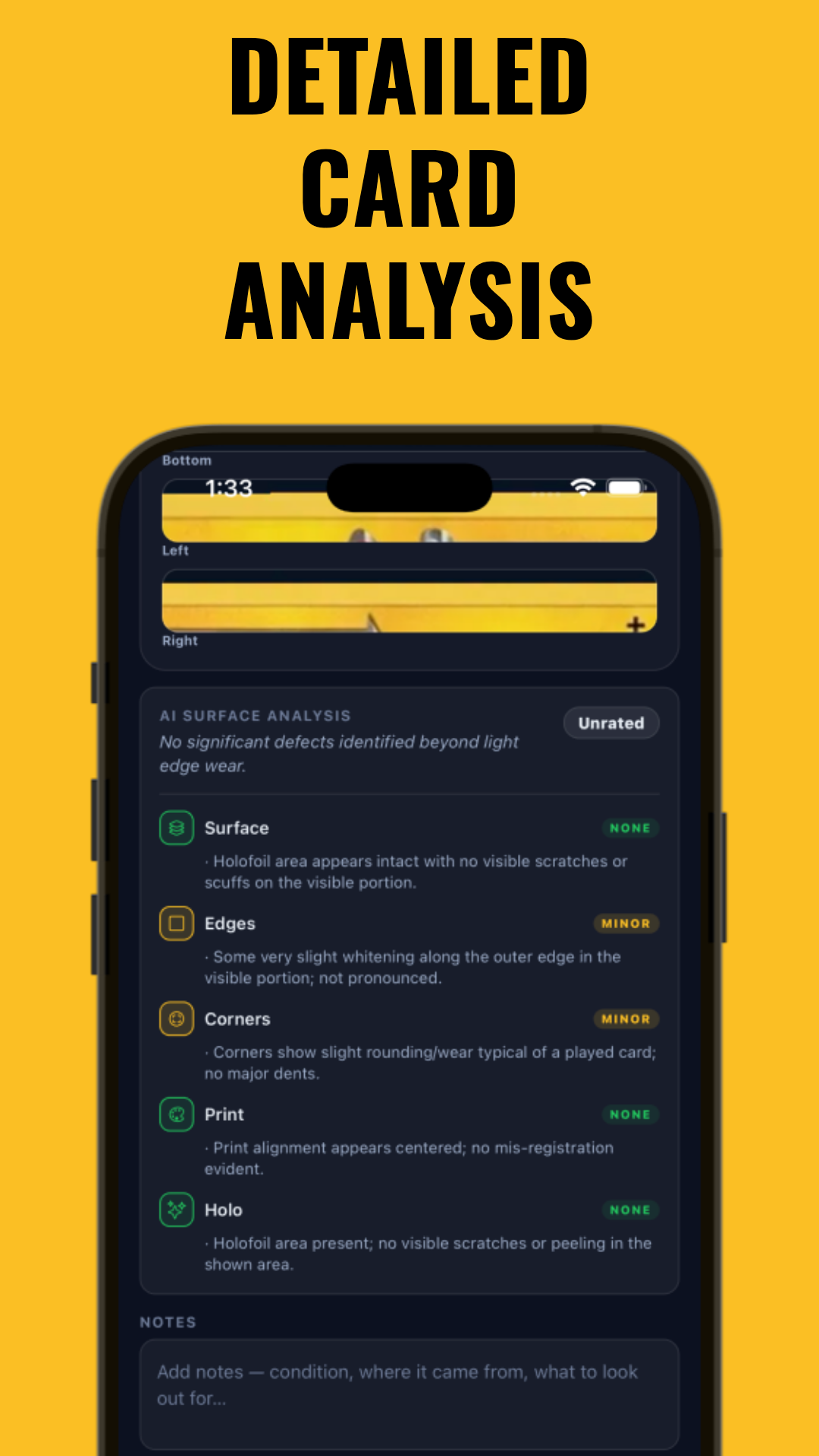
). Note that digital grading tools are not a substitute for professional grading and may not always detect every flaw.
Section 4: Corner Wear Grading & Edge Whitening – What Matters Most
Corner Wear – How Much is Too Much?
Corner wear grading is a significant factor. PSA, BGS, and CGC standards are strict: even tiny touches can prevent a 10. The most common issues:
- Soft Corners: Rounded or blunted from shuffling or play.
- Chipping/Fraying: Paper loss or fuzziness at the corner tip.
- Dings: Noticeable compression or folding.
To grade a 10, corners must be "mint"—sharp, square, and free of any visible flaws. Even one soft corner usually means a maximum 9.
Whitening on Card Edges – How It Affects Value
Whitening on card edges almost always lowers a card's grade. This can be caused by:
- Rubbing against deck boxes, sleeves, or binder pages.
- Poor cutting at the factory (can occur in vintage cards).
Visible white spots or flecks along the card’s edge indicate paper loss or exposure. Graders penalize cards with whitening, especially on the front or along the top edge.
Tips for Minimizing Edge and Corner Damage
- Store cards in penny sleeves and top loaders immediately.
- Avoid overfilling binders or stacks.
- Handle by the edges only, with clean hands or gloves.
For storage advice, see How to Store Valuable Cards: The Ultimate Collector's Guide.
Section 5: Print Lines on Cards – Identification & Grader Tolerances
What Are Print Lines?
Print lines on cards are straight, shiny or dull lines caused during the printing and cutting process. They may appear as:
- Parallel, uniform streaks—often horizontal or vertical.
- Fine lines only visible in direct light and at certain angles.
- Occasional color breaks or ink skips.
How Much Do Print Lines Matter?
Print lines are a unique case:
- Minor, single print lines (especially on the back) are sometimes forgiven for older cards (pre-2000s).
- Multiple or severe lines on the card front usually drop a card to an 8 or below.
- Modern grading is stricter; even faint print lines can prevent a 10 unless extremely common for the set.
Identifying Print Lines
Best practices:
- Use strong, angled light and tilt the card slowly.
- Check both sides—some lines are only on the back.
- Compare with other cards from the same print run to judge severity.
Knowing what is normal for a set helps when determining, "will this card grade a 10?" For more on how AI tools see print lines, check the AI-Focused Comparison: How AI Transforms Card Centering Analysis.
Section 6: Lighting, Photography, and Pre-Grading Checklist
The Best Lighting for Trading Cards
Inspection and photography rely on ideal lighting. The best lighting for trading cards is:
- Daylight LED (5000K-6500K), high CRI (>90) for true color and detail.
- Diffuse—avoid direct beams that cause glare or shadows.
- Multiple angles—move the light source to catch flaws.
Natural daylight from a north-facing window is also excellent, if available.
How to Photograph Cards for Grading
Grading submissions often require photos. For best results:
- Use a flat, neutral background (white or grey).
- Position the camera directly above the card; avoid extreme angles.
- Use a tripod or phone stand to prevent blur.
- Take close-ups of corners, edges, and any flaws.
- Turn off flash; use a diffused lamp or ring light instead.
Pre-Grading Checklist
- Inspect corners, edges, and surface under good light and magnification.
- Check for miscuts, print lines, and centering.
- Photograph the card from multiple angles, highlighting any issues.
- Compare your card to online examples of graded 10s.
- Log your findings; consider digital pre-grading for a second opinion.
Section 7: Digital Grading Tools – How Midpoint Streamlines Pre-Submission
Why Use Digital Tools for Pre-Grading?
Before spending money per card on professional grading, digital tools let you simulate the grading process at home. Apps like Midpoint combine AI with expert grading standards to give you:
- Centering measurement down to the millimeter—no more guessing.
- Detection of surface flaws, edge whitening, and corner wear via your phone camera.
- Estimated PSA, BGS, CGC, and TAG grades based on publicly available grading standards.
- Portfolio tracking so you can see how card values change over time.
How Midpoint’s AI Condition Analysis Works
Midpoint uses image recognition and AI models trained on a large number of cards. You simply photograph your card, and the app:
- Measures centering (front and back).
- Highlights surface scratches, print lines, and edge/corner whitening.
- Predicts the most likely grade from each grading company, with a breakdown by flaw.
This gives you a sense of, "will this card grade a 10?"—potentially saving money on submissions with little chance for a top grade. For more on digital centering, see Card Centering Tool: Accurate Card Grading Estimates. Keep in mind that digital tools provide estimates and cannot guarantee professional grading outcomes.
Section 8: Grader Forgiveness – What Truly Lowers a Card’s Grade?
What Do Graders Forgive?
Not all flaws are equally significant. Understanding grader forgiveness can inform which cards you send in.
- Minor print lines on backs, especially on vintage cards, are sometimes forgiven.
- Tiny specks of whitening on a single edge may still earn a 9 or 10 if otherwise flawless.
- Slightly off-center cards sometimes still get a 10 if within tolerances (e.g., PSA allows 55/45 front for 10s).
What Do Graders Penalize Most?
- Surface indents or creases – these almost always prevent high grades.
- Severe miscuts – usually only appealing to error collectors.
- Obvious corner dings or edge chipping – especially on the front.
Documented Tolerances
- PSA 10: Centering 55/45 front, 75/25 back, virtually no flaws.
- BGS 10: 50/50 to 55/45 centering, perfect corners and surface.
- CGC 10: Similar to BGS; surface and corners must be flawless.
For a detailed breakdown, compare grading scale criteria in Grading Scale Differences by Company.
Conclusion
Whether you’re a seasoned collector or new to trading cards, understanding miscut cards value and the impact of various flaws—surface damage, corner wear, print lines, and edge whitening—can help you make informed decisions. Learning how to check card condition, use the best lighting for trading cards, and photograph them properly is the foundation of smart collecting and successful grading submissions. Digital tools like Midpoint offer analysis that can assist with pre-grading, but professional grading results may vary. Armed with this knowledge, you can better answer, "will this card grade a 10?"—and maximize both your collection’s value and your enjoyment of the hobby.
FAQ
Q: How do I check card condition before grading?
A: Use bright, diffuse lighting and a 10x-20x magnifier. Inspect corners, edges (for whitening), surface (for scratches/print lines), and centering. Digital apps like Midpoint offer AI-powered pre-grading for additional perspective, but results may differ from professional grading.
Q: What is surface damage on a card and how much does it matter?
A: Surface damage includes scratches, scuffs, print lines, stains, and dents. Even minor marks can prevent a card from grading a 10. Deep flaws can significantly lower value and grade.
Q: How do graders evaluate corner wear and edge whitening?
A: Graders look for sharp, clean corners and edges. Any whitening, chipping, or fraying typically drops a card’s grade, especially if visible on the front.
Q: Do print lines on cards always lower the grade?
A: Not always. Minor print lines (especially on older cards) may be forgiven, but multiple or severe lines, especially on the front, usually prevent a top grade.
Q: Can a miscut card still be valuable?
A: Yes, but it depends on the card’s rarity, era, and appeal to error collectors. Most miscuts lower value, but dramatic or unique miscuts can attract buyers interested in errors.
Q: What’s the best way to photograph cards for grading?
A: Use a flat, neutral background, diffuse daylight or LED lighting, and a tripod. Photograph all corners, edges, and flaws clearly for best results.
Free to start
Try the Midpoint app
Grade any card from a photo, see its raw and PSA 10 value, and track what your collection is worth — free.
Get it on iPhoneGet it on Android