Best Card Grading Tools Compared: 2026 Accuracy, Features & Pricing
Compare the best card grading tools for 2026—accuracy, PSA/BGS/CGC prediction, subgrades, price, and sports vs. TCG coverage. Find the top free and paid apps.

Estimated reading time: 13 min
Key Takeaways
- The best card grading tools can approach the accuracy of professional graders for centering and subgrade assessment, with some apps reporting close grade correlation to PSA/BGS in internal tests.
- AI-based graders differ in sports vs. TCG (Pokémon, MTG) support, subgrade transparency, and price—some offer free unlimited scans, others charge per card or monthly.
- Subgrade breakdowns (centering, corners, edges, surface) and market value integrations are available in leading apps, but only a few are truly transparent.
- AI tools are best for pre-screening, not for detecting alterations or replacing professional grading—know their limits before you submit.
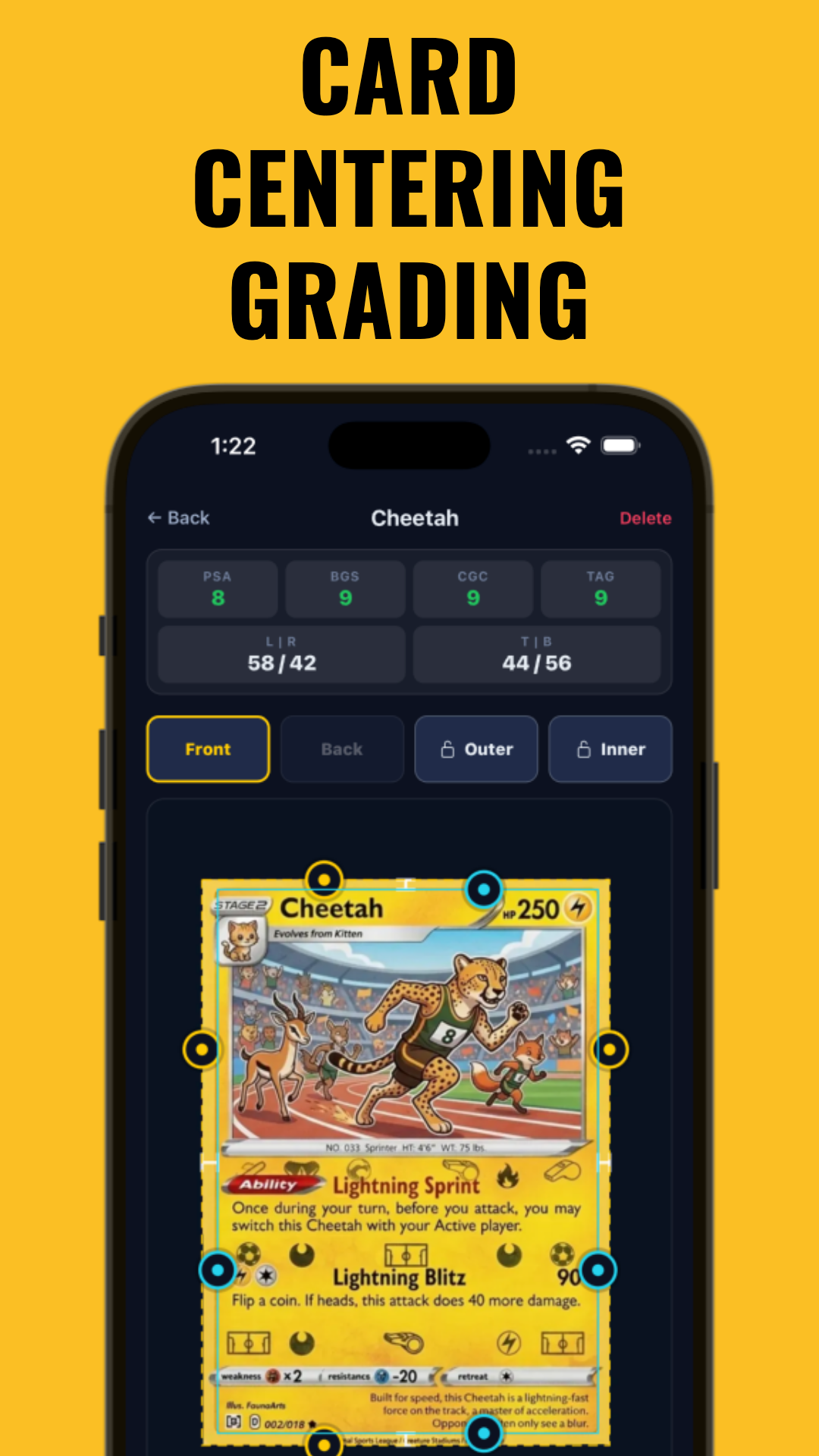
- Midpoint focuses on centering precision, offering instant PSA, BGS, CGC, and TAG estimates before you spend $30+ on grading.
Table of Contents
- Section 1: The Rise of AI Card Grading Tools
- Section 2: Accuracy Showdown—How Well Do AI Graders Predict PSA/BGS/CGC Results?
- Section 3: Subgrade Transparency—Centering, Corners, Edges & Surface Compared
- Section 4: Card Type Coverage—Sports Cards vs. TCGs
- Section 5: Pricing Breakdown—Free vs. Paid AI Grading Tools
- Section 6: Best Use Cases, UI & Integration with Market Data
- Section 7: The Limits of AI Card Grading
- Conclusion
- FAQ
Section 1: The Rise of AI Card Grading Tools
The Need for Accurate Pre-Grading
Sending trading cards for professional grading can cost $30 or more per card, not including shipping and wait times. As the market for Pokémon, sports, and TCG cards boomed, collectors sought a way to estimate grades before submitting. Enter AI-powered card grading tools: software and apps that analyze scans or photos to predict professional grades, providing collectors with data-driven insights at a fraction of the cost.
This need became especially urgent as the grading backlog at PSA and BGS led to months-long delays. Collectors faced uncertainty: was it worth risking $30–$50 per card plus postage if the card might only score a PSA 8? AI tools now help collectors filter out cards unlikely to hit the coveted PSA 9 or 10, and they help sellers accurately describe raw cards online. For high-volume dealers, pre-grading also speeds up inventory processing and can improve cash flow by reducing reliance on slow professional turnaround times.
How AI Grading Tools Work
Most modern tools use computer vision and machine learning. Card images are uploaded or scanned, then algorithms assess centering, corners, edges, and surface—mimicking the process used by PSA, BGS, or CGC graders. Some apps specialize in a single aspect, like Midpoint for centering, while others aim for an overall grade prediction.
The typical workflow: you upload a scan or photo, the tool detects card borders (sometimes automatically, sometimes with user cropping), and then breaks down measurements. For centering, Midpoint and similar apps calculate border ratios to the tenth of a percent, showing vertical and horizontal offsets. For corners and edges, advanced apps use trained neural networks to flag nicks, whitening, and wear, overlaying hotspots on your card image. Surface analysis is typically the hardest for AI, especially for holofoil or textured cards, but new tools are improving steadily. Under the hood, these systems are trained on large datasets of professionally graded cards, learning to mimic the decisions of human experts.
Popular AI Card Grading Apps in 2026
- PreGradeCards: Fast PSA/BGS/CGC grade prediction, strong in sports cards.
- CardGrade: Robust subgrade breakdown, good for TCGs and surface analysis.
- CardMintAI: Known for user-friendly interface and market value integration.
- TCGrader: Best free unlimited grading for Pokémon, MTG, and Yu-Gi-Oh!
- Midpoint: Precision centering measurement down to the millimeter for all card types.
Each tool has unique strengths. For example, PreGradeCards is favored by sports card dealers for its speed and batch processing, while CardGrade appeals to advanced collectors who want to see heatmaps and overlays pinpointing flaws. TCGrader’s unlimited free scans make it a go-to for bulk Pokémon and MTG collectors, while CardMintAI’s integration with eBay and Goldin Auctions sales data helps investors make buy/sell decisions instantly. For a deep dive on centering, see Card Centering Tool: Accurate Card Grading Estimates.
Section 2: Accuracy Showdown—How Well Do AI Graders Predict PSA/BGS/CGC Results?
Benchmarks and Testing Methodologies
Accuracy is the critical benchmark. The best card grading tools are now tested using batches of cards that have been graded by PSA, BGS, or CGC, comparing the app’s predicted grade to the real result. Some apps like PreGradeCards and CardGrade report their correlation rates (such as ±0.5 of the actual grade for a high percentage of cards in published test sets), though these results are often based on internal or community-contributed datasets.
To ensure fairness, most accuracy studies randomly select 100–500 cards spanning modern and vintage, sports and TCGs, and various conditions (from pack-fresh to well-worn). Each card is scanned or photographed using a standard lightbox setup to minimize shadows and glare. After running the images through each app, the predicted grades are compared against the actual slabbed grades. Some apps publish a confusion matrix, showing percentage matches for PSA 8, 9, and 10 predictions. Others provide variance charts or full CSVs for community review. Transparency in reporting is a positive sign, but results can vary depending on methodology and sample selection.
Top Performers—2026 Results
- PreGradeCards: Reports high overall accuracy for PSA and BGS, especially with modern sports cards. Internal tests claim ±0.5 grade match in over 80% of tested samples. Particularly strong at distinguishing between PSA 9 and 10, which can mean a significant value difference for flagship rookie cards. PreGradeCards also offers batch export for dealers tracking many cards at once.
- CardGrade: Slightly less accurate for PSA in some reports, but strong for subgrade breakdown and TCG cards. Internal data suggests ±0.5 grade match in a high percentage of cases. Its surface analysis is noted for holofoil Pokémon and Magic cards, and it provides visual evidence for every subgrade.
- Midpoint: Not a full grader but delivers millimeter-level centering accuracy, often matching PSA’s centering subgrade closely. Users can see how their card would fare with PSA, BGS, CGC, or TAG based on centering alone, making it useful for pre-screening cards where centering is the likely bottleneck.
- TCGrader: Free tool, generally accurate for Pokémon and MTG centering and corners, but less reliable on complex surfaces or sports cards. Still, it gives a reasonable estimate for many base set Pokémon cards when image quality is good.
- CardMintAI: Good for overall grade prediction, but accuracy may decrease for vintage cards with wear. Best used for modern TCGs and recent sports cards, where print standards are more consistent.
For a technical look at AI accuracy in centering, this AI-focused comparison breaks down recent advances.
Limits and Variability
Accuracy can fluctuate depending on card type, card condition, and the quality of the uploaded image. Lighting, cropping, and scanner quality all impact the AI’s ability to assess a card. For example, a scan at 1200dpi on a flatbed scanner gives better results than a phone photo with glare or shadows. Some apps offer guides for best practices: always use diffuse light, crop tightly, and avoid reflections. Most tools publish their validation data—if not, be cautious of strong claims. When in doubt, test the app with cards you already have slabbed to see if its predictions match real-world results.
Section 3: Subgrade Transparency—Centering, Corners, Edges & Surface Compared
Why Subgrade Breakdown Matters
Collectors and investors want more than just a predicted PSA 9 or BGS 8.5. Understanding which subgrades are holding a card back—centering, corners, edges, or surface—guides decisions on whether to submit, sell, or even attempt restoration (where legal). Subgrade transparency distinguishes advanced tools from black-box apps.
For example, if a card shows perfect centering but only scores an 8.0 predicted grade, subgrade transparency can reveal that a tiny nick on one corner or a faint print line is the culprit. This enables sellers to disclose flaws honestly, buyers to make informed decisions, and collectors to focus improvement efforts. For high-stakes cards (think 1986 Fleer Jordan or 1st Edition Charizard), knowing the exact reason for a potential sub-9 grade can be financially significant.
Apps with Detailed Subgrade Reporting
- CardGrade: Full subgrade display for centering, corners, edges, and surface, with visual overlays and defect heatmaps. Users can mouse over or tap to see individual flaw locations, aiding in both education and sales listings. Exports include full subgrade data for spreadsheet tracking.
- Midpoint: Specialized in centering, provides centering % (vertical/horizontal), millimeter offsets, and centering-based PSA/BGS/CGC estimates. See the precision guide to measuring centering for hands-on examples. Midpoint overlays centering lines, showing users exactly how the card's print aligns with the borders, making it easy to compare to grading standards.
- CardMintAI: Shows centering and surface grades, but corners/edges are less detailed. Surface analysis includes detection of scratches and print lines, highlighted on the image for easy review.
- TCGrader: Corners and centering only; surface and edge analysis limited. Still, it provides a written summary pointing out any major corner dings or centering issues that could hurt grade.
- PreGradeCards: Surface and corners have binary pass/fail feedback; centering is a numeric score. Somewhat less detailed, but quick for bulk screening.
Transparency and Exportability
The best tools let users export subgrade data or see overlays showing exactly where a card’s flaws are detected. This is crucial for high-value cards and for tracking changes over time. For a practical, hands-on approach to pre-grading, see How to Pre-Grade Your Card: A Step-by-Step Guide.
Export features matter for dealers and serious collectors. For example, CardGrade's CSV export lets you track trends across your collection—identifying, say, if a batch of cards from a certain set consistently suffers from poor edges or off-centering. Visual overlays, especially those that highlight scratches, dings, or print defects, are invaluable for sellers who want to show buyers why a card is likely a PSA 8 instead of a 9. For insurance or record-keeping, exported subgrades can provide digital provenance and help resolve disputes with graders or buyers down the line.
Section 4: Card Type Coverage—Sports Cards vs. TCGs
Sports Cards: Challenges and Coverage
Sports cards (baseball, basketball, football, etc.) present unique challenges—foil finishes, varying border designs, and print variations. Not all AI grading tools are optimized for these differences. PreGradeCards and Midpoint are noted for their support here, with templates for modern and vintage sports cards.
For example, 1980s Topps baseball cards have notoriously inconsistent centering and print defects, while modern Panini basketball cards use chromium stock that reflects light unevenly. Midpoint’s centering tool accounts for border color variations and can handle both standard and mini card sizes. PreGradeCards recognizes set-specific quirks, such as the thin gold borders on 1990s Upper Deck or the thicker white borders on older Topps cards. If you collect obscure sports like soccer or wrestling, check the app's support list—some tools now recognize a wide range of sports card templates, including hockey and Formula 1.
TCG Cards: Pokémon, MTG, Yu-Gi-Oh!
Trading Card Games (TCGs) have exploded in value, and grading standards differ from sports cards. Pokémon cards, for example, have unique border ratios, while Magic: The Gathering cards often show print and cutting inconsistencies. TCGrader is a leading free option for TCGs, offering unlimited grading for Pokémon, MTG, and Yu-Gi-Oh! CardGrade also covers TCGs with robust subgrade analysis.
Pokémon collectors benefit from AI tools that understand the subtle differences in border width across print runs and languages (e.g., Japanese vs. English Pokémon cards). Magic collectors can use apps to spot "factory nicks" or see how off-center a Revised dual land is, which can mean a significant price difference. Yu-Gi-Oh! cards, with their small size and dark borders, often trip up lesser tools, but leading apps now offer templates for all major TCG formats. Bulk submitters processing many TCG cards for grading can save by filtering out cards that won’t hit the desired grade.
One Piece, Dragon Ball, and Niche TCGs
Not all tools keep up with emerging TCGs like One Piece or Dragon Ball Super. Check each app’s coverage list if you collect niche sets. Some, like CardMintAI, are rolling out support for less common TCGs in 2026.
- For step-by-step TCG centering, see How to Use a Centering Tool for Pokémon Cards.
If you collect Digimon, Weiss Schwarz, or other niche TCGs, watch for beta features—some apps let you submit new templates, and user feedback often drives rapid improvements. Community-led projects have helped expand support to a growing number of TCGs, and you can usually request priority support if your favorite set isn’t yet recognized.
Section 5: Pricing Breakdown—Free vs. Paid AI Grading Tools
Pricing Models Compared
- TCGrader: Completely free and unlimited for TCGs (Pokémon, MTG, Yu-Gi-Oh!).
- Midpoint: Free tier for single cards; paid plans from $7/month for bulk uploads and advanced grade estimates.
- PreGradeCards: Free basic scans; $0.50–$1.00 per card for full subgrades and PSA/BGS/CGC prediction, or $12–$30/month for unlimited.
- CardGrade: Free trial (10 cards/month), then $15/month or $1 per card.
- CardMintAI: $10/month unlimited or $1.50/card pay-per-use.
Which Option Is Best for You?
If you only need occasional grading, free tools like TCGrader or Midpoint’s free tier will suffice. For bulk grading (pre-screening dozens or hundreds of cards before submission), monthly subscriptions make sense. Pay-per-card options are best for one-off high-value cards.
For example, if you’re preparing a 100-card PSA submission, Midpoint’s $7/month plan or PreGradeCards’ unlimited tier may be cost-effective. If you’re a casual collector evaluating a single Charizard, you can stick to free scans. CardGrade’s free trial is useful for testing before committing, and CardMintAI’s unlimited plan is designed for dealers who want to batch process and sync market values directly.
Hidden Costs & Limitations
Check for image upload limits, monthly caps, or restrictions on exporting results. Some apps only allow high-resolution scans on paid plans. Always balance cost against your grading volume and the features you need.
Be aware of “freemium” models that throttle high-res scans or limit batch analysis unless you upgrade. For example, some tools watermark results or restrict CSV export to paid users. Also, keep in mind that bulk pricing is sometimes negotiable for high-volume dealers—don’t hesitate to reach out to app developers for custom rates if you’re processing hundreds of cards per month.
Section 6: Best Use Cases, UI & Integration with Market Data
Top Use Cases for AI Grading Tools
- Pre-screening: Avoid sending cards unlikely to score PSA 9 or 10, saving on grading fees.
- Portfolio tracking: Monitor condition and value of your collection over time.
- Investment analysis: Estimate ROI before buying or selling graded cards.
Dealers use these tools to quickly sort raw card lots, prioritizing which cards to submit and which to sell raw. Collectors may track seasonal changes in condition (humidity and storage can affect surface and edges), while investors use grade predictions and live market data to determine potential profits. Many apps now allow side-by-side comparison of identical cards—helping you decide, for instance, which PSA 8 Jordan rookie is more likely to bump to a 9 on resubmission.
User Interfaces—Web, Mobile, Desktop
Most leading apps are browser-based, requiring only a phone camera or scanner. Some offer dedicated iOS/Android apps (CardMintAI, CardGrade). Midpoint’s web tool is optimized for both desktop and mobile and features a clean, intuitive workflow: upload, crop, analyze centering, get instant grade estimates.
User experience varies: CardGrade's mobile app guides users step-by-step, automatically detecting card orientation and cropping for faster scanning. Midpoint’s desktop flow is optimized for batch uploads, allowing dealers to drag and drop an entire folder of scans at once. Some apps, like CardMintAI, integrate directly with scanner software for one-click imports, saving time for bulk grading operations. Look for features like heatmap overlays, batch export, and easy sharing for maximum efficiency.
Market Value and Data Integration
Some tools, like CardMintAI and CardGrade, integrate real-time market values and ROI calculators. This means you can see how a predicted PSA 9 vs. PSA 10 affects your card’s value. How Centering Impacts Card Value: A Detailed Guide explores this dynamic in depth.
Market data integration can be a game-changer—apps pull recent eBay sales, auction results, and population reports to estimate value curves. For example, a 1% difference in centering can mean a substantial swing for a 1952 Topps Mantle, or a notable difference for a PSA 9 vs. 10 Base Set Charizard. Some tools even show a "profit curve," letting you see at what predicted grade your grading investment pays off. For investors and dealers, this makes buy/sell/trade decisions more data-driven than ever.
Section 7: The Limits of AI Card Grading
What AI Can and Cannot Detect
- AI excels at: Measuring centering, flagging obvious corner/edge defects, spotting print lines or scratches (on clear, high-res images).
- AI struggles with: Detecting trimming, recoloring, card doctoring, subtle alterations, or restoration. Only professional graders can reliably spot these.
Even the best AI tools are limited by image quality and what’s visible to the camera. For example, a card that has been expertly trimmed to remove edge wear may appear flawless to an AI but would be caught by a professional grader looking at card dimensions, paper stock, and edge fiber under magnification. Similarly, recoloring (using marker to cover whitening) is often invisible to the naked eye—and to AI—unless a scanner with UV or infrared is used, which is beyond the scope of current consumer apps.
When to Rely on a Professional Grader
AI grading tools are best for pre-screening—deciding which cards are worth submitting to PSA, BGS, CGC, or TAG. They cannot replace human experts for authentication or identifying tampering. For high-value or vintage cards, always use AI as a supplement, not a substitute.
If you are submitting cards worth $1,000 or more, or any card with provenance concerns (e.g., 1950s Mantles, high-value Pokémon trophy cards), always defer to professional graders. Use AI to narrow the field, but trust PSA, BGS, or CGC for final calls on authenticity, trimming, or restoration. AI can’t spot rebacked cards, pressed corners, or chemical alterations—these require hands-on inspection and industry experience.
Future Improvements
Expect rapid progress: as training datasets grow, AI will likely get better at surface defect detection and may eventually flag trimmed or altered cards. Until then, use tools like Midpoint to maximize your odds—then trust the experts for final certification.
Some companies are experimenting with hybrid models, where AI flags "suspicious" cards for extra manual review. As machine learning models are trained on more examples of altered or trimmed cards, detection rates may improve. The next frontier may include AI-assisted authentication, but until then, blending digital pre-screening with professional grading is the safest approach.
Conclusion
The best card grading tools in 2026—PreGradeCards, CardGrade, CardMintAI, TCGrader, and Midpoint—offer new levels of accuracy and value for collectors. Whether you collect vintage sports, Pokémon, MTG, or niche TCGs, there’s an app tailored for your needs. Free options like TCGrader are useful for unlimited TCG grading, while Midpoint provides centering accuracy before you pay for professional grading. For the latest on how AI is reshaping pre-grading, explore this practical guide to estimating your card before submission. Ultimately, blend digital tools with expert judgment for the best results—and always stay informed as new technology emerges.
AI card grading tools are not a replacement for professional authentication, but they are now an important part of the collector and dealer toolkit. They save time and money, reduce grading risk, and help you make smarter buying, selling, and submission decisions. As AI evolves, expect even greater transparency, broader card coverage, and tighter integration with real-time market analytics. Until then, tools like Midpoint and CardGrade can help you maximize your odds and protect your investments, one scan at a time.
FAQ
Q: Which AI card grading app has the highest accuracy for PSA predictions in 2026?
A:
PreGradeCards is reported by some users and internal tests to lead for PSA prediction accuracy, matching within ±0.5 grade of actual PSA results in a high percentage of tested cases. CardGrade and Midpoint are also strong, with Midpoint excelling in centering accuracy.
Q: Is there a completely free AI card grading app that doesn't limit the number of scans?
A:
Yes, TCGrader offers unlimited free scans for Pokémon, Magic: The Gathering, and Yu-Gi-Oh! cards. For sports cards, most tools have limited free tiers or charge per scan.
Q: Do AI grading apps replace professional grading services like PSA or BGS?
A:
No. AI grading tools are useful for pre-screening, but they can't authenticate cards or reliably detect altered/trimmed cards. Professional grading remains essential for certification and maximum resale value.
Q: Which card grading app provides the most detailed subgrade breakdown (centering, corners, edges, surface)?
A:
CardGrade is notable for its detailed subgrade reporting and visual overlays. Midpoint is best for centering, with precise millimeter measurements and centering-based grade estimates.
Q: How much does it cost to use the best AI card grading tools per card?
A:
Paid tools typically charge $0.50–$1.50 per card, with monthly unlimited plans ranging from $7 to $30. TCGrader is free for TCGs; Midpoint offers a free tier for single cards and paid plans for bulk analysis.
Q: Can AI grading tools detect altered or trimmed cards before professional submission?
A:
No, AI graders cannot reliably spot trimming, recoloring, or other alterations. Only professional graders can authenticate and identify tampering. Use AI tools for pre-screening, not authentication.
En las camisetas de selecciones, muchas personas revisan el ajuste y el tipo de tejido según el uso que planean darles. Quienes comparan alternativas pueden usar camiseta de Espana como punto de partida para observar tipos de camiseta y detalles básicos. Ese tipo de revisión es útil tanto para uso cotidiano como para conservar la prenda en buen estado.
Free to start
Try the Midpoint app
Grade any card from a photo, see its raw and PSA 10 value, and track what your collection is worth — free.
Get it on iPhoneGet it on Android